HEXA VPN
HEXA VPN is Hazel Mobile's free, fast and secure VPN proxy app on Google Play. It's a popular consumer VPN with a large, active user base — ranked around 6th in its category in India — and the app whose real usage telemetry this AI analyst agent runs on.
▶ View HEXA VPN on Google Play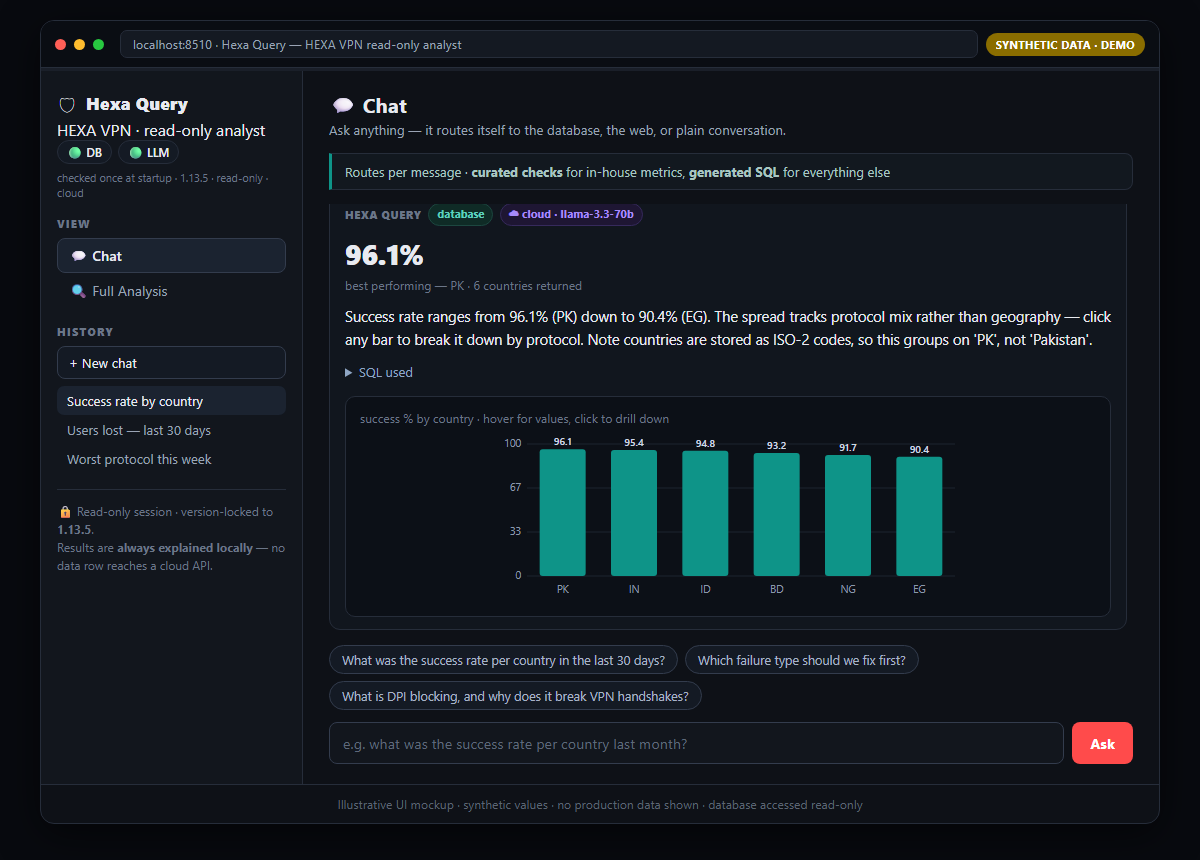
Case Study 2 — Automated Data Analyst AI Agent (HEXA VPN)
The Problem
The data-quality framework from Case Study 1 worked, but running it was manual: run the SQL, read the results, work out why the numbers moved, research fixes, write the report. Slow, easy to skip, and regressions sat undetected between runs. Hazel needed the same rigour running automatically, safely, and privately against a live database.
What I Built
Hexa Query — an agent that reproduces the whole workflow on its own, then answers free-form questions about the same telemetry. Read-only, version-locked to app_version 1.13.5.
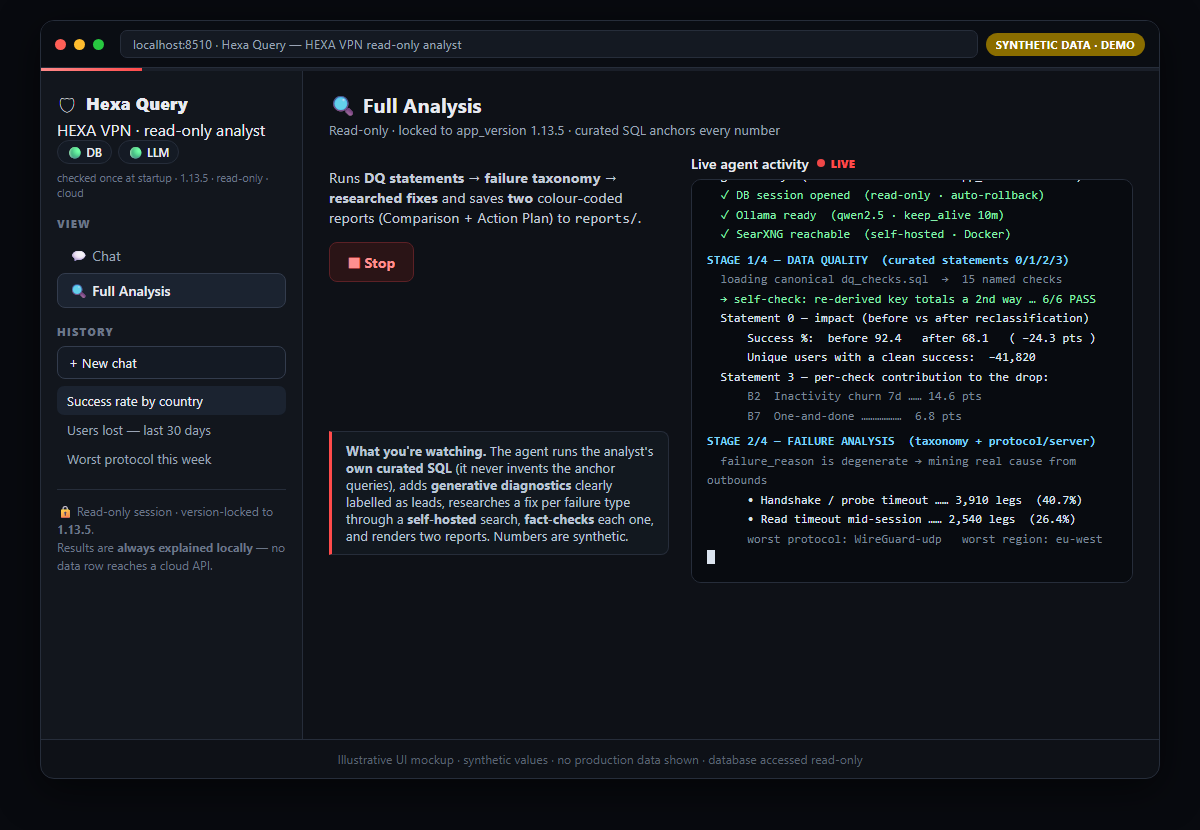
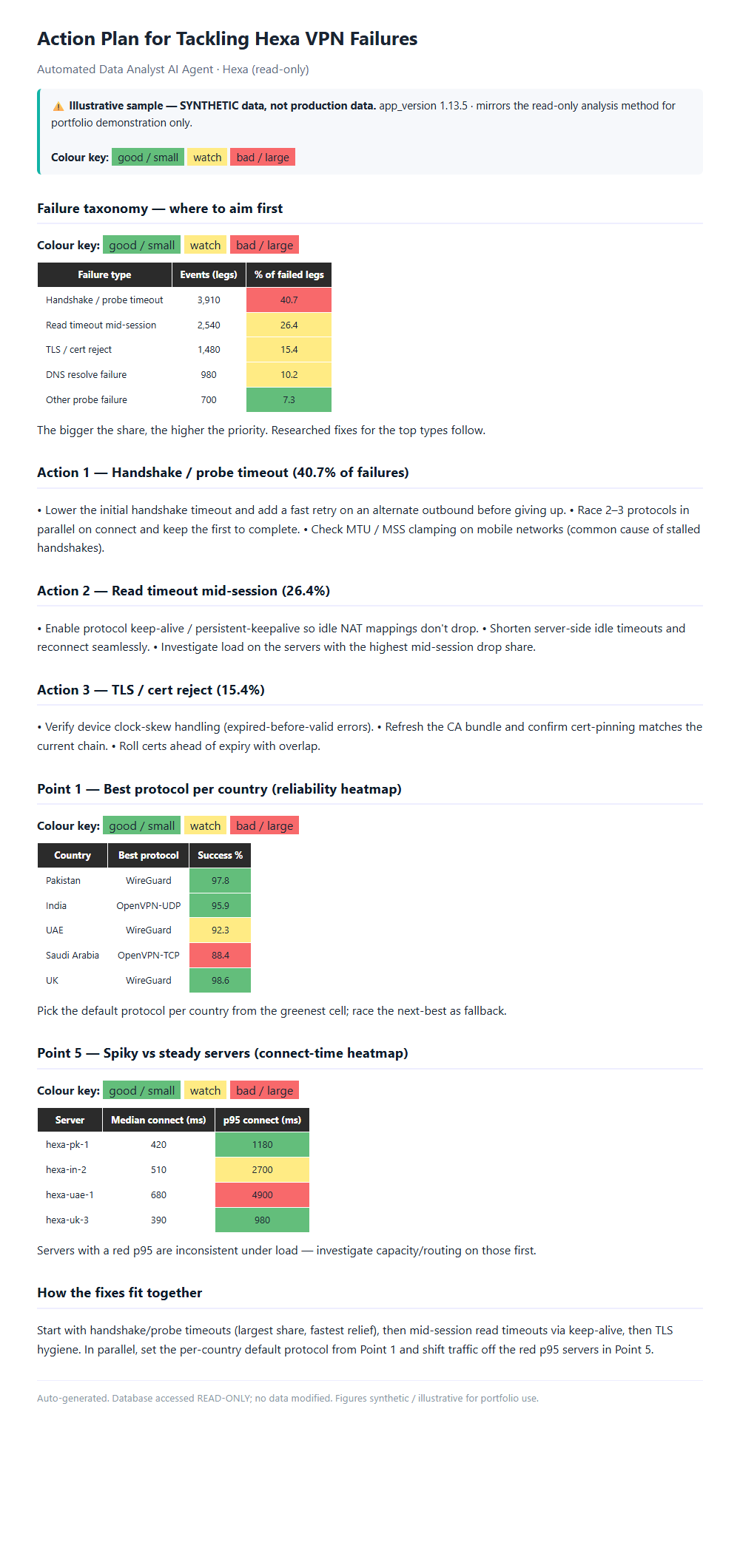
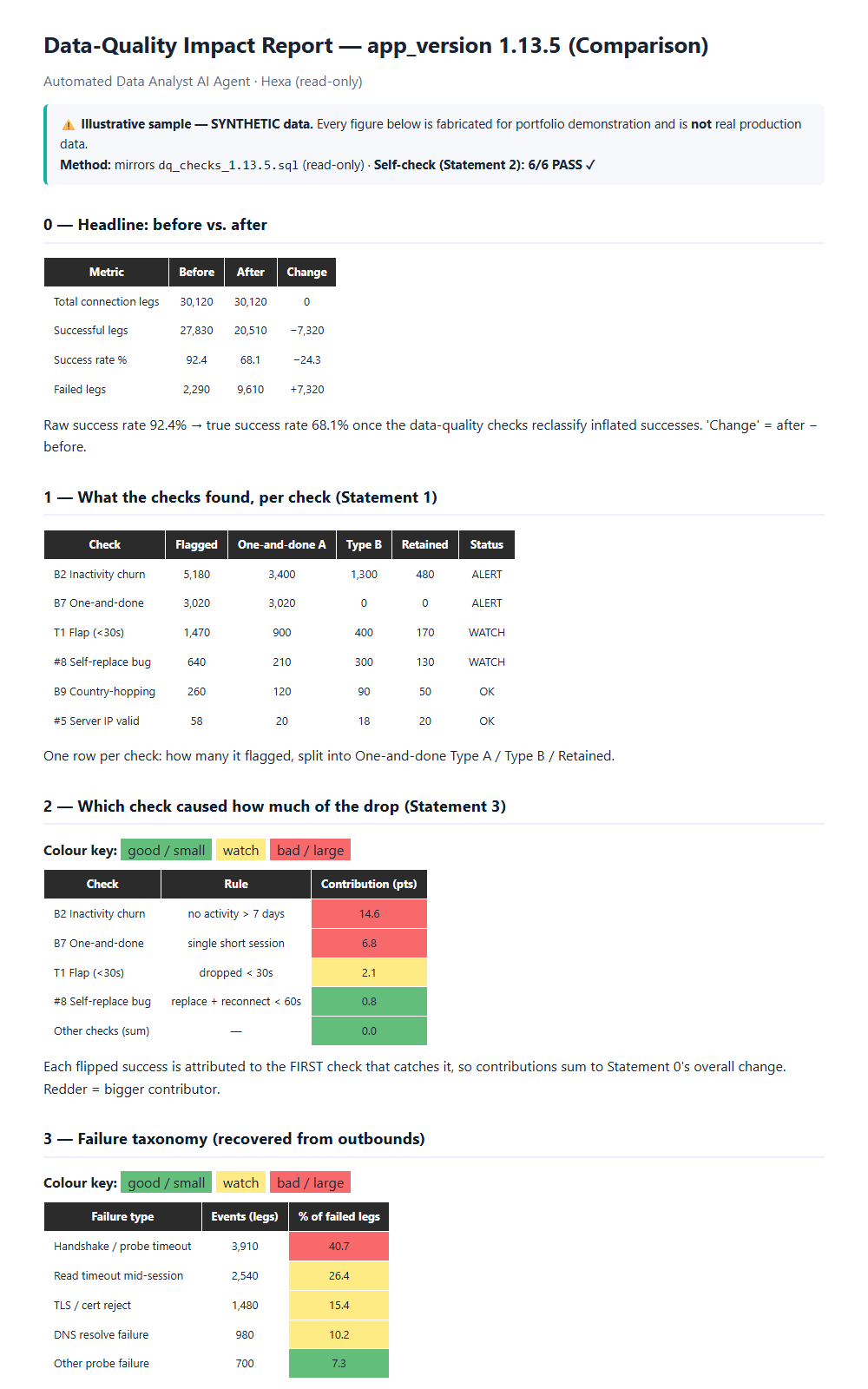
Full Analysis runs the pipeline end to end: curated DQ checks (Statements 0–3, including the before/after reclassification) → failure taxonomy → fix research via self-hosted search, filtered to trusted domains and semantically cached → two green/amber/red HTML reports (a Comparison and an Action Plan), emailable on a schedule via n8n.
Chat answers anything. A router decides whether a question needs the database, a web search, or is just conversation, so the user never picks a mode. Every answer arrives with the value, the exact SQL behind it, and an auto-selected chart you can hover and click into. A pill shows which model answered — cloud · llama-3.3-70b or local · qwen2.5 — and a Stop button cancels a slow query at the next checkpoint.
The Generative Upgrade — from fixed checks to any question
The first version could only answer what I'd already written SQL for. So I added a LangGraph state machine that writes its own queries, with the curated checks still anchoring the trusted numbers:
route → generate SQL → validate (guard + EXPLAIN) → execute (read-only) → verify → explain
             ▲                                              │
             └──────────── repair: feed the DB error back ───┘
- It writes the SQL, I keep the guardrails. Every generated query passes the read-only
guard.py(SELECT/WITH only, version-scoped), isEXPLAIN-checked before touching data, and runs under an injectedLIMITand statement timeout. On error, the DB's own message is fed back and the query is rewritten (capped retries). - A semantic layer makes answers business-correct. The hard part isn't syntax, it's meaning — a model can't guess what we count as an "install". So 22 documented metric definitions with reference SQL give it the business meaning to compose from.
- The schema documentation mattered more than prompt tuning. All 33 columns and their traps — e.g. country columns hold ISO-2 codes (
'PK', not'Pakistan'), which silently returned zero until documented. Most failures I hit were semantic, not syntactic: valid SQL answering the wrong question. - It says when it can't answer. Installs, revenue and crashes live in Firebase, not our telemetry, so an unavailable-metrics registry redirects instead of letting the model invent a plausible proxy.
- It degrades instead of failing. When the cloud tier hits its daily cap, the engine falls back to the local model mid-question, with a visible notice and a reduced retry budget.
- Curated checks remain ground truth. Generated results are labelled "a lead to verify, not an anchor number."
Privacy & Data Governance (a first-class design goal)
Cloud writes the SQL; results are always explained locally. A single choke-point module controls everything outbound, on the insight that a model needs the structure to write a query, not the data:
| Leaves the machine | Never leaves |
|---|---|
| schema (names/types only) | any data row or query result |
| my documented metric definitions | PII columns (user tokens, server IPs) |
| the question (PII-scanned by Presidio) | database credentials / the connection |
| a sanitised error kind on retry | host, port, user, or any literal value |
The cloud-explain code path was deleted, not disabled — there is no flag to switch on by mistake. LLM_MODE=local runs the whole system with nothing leaving at all.
I audited this boundary rather than assuming it, which surfaced three real problems worth naming:
- The router prompt bypassed the choke point — conversation context could reach the cloud unscanned.
- A safety check keyed off a CSS class the UI layer added, so a presentation change could silently disable a privacy control. Now an engine-owned marker. Security logic must never depend on presentation.
- Presidio cached its own failure. It needs ~800 MB to initialise; under memory pressure that failed, and the code cached the failure permanently while logging "not installed" — a PII scanner that switched itself off and misreported why. It now retries and reports the real reason. A guard that can disable itself quietly is worse than no guard — you stop checking.
Read-Only Safety
Three layers: a read-only session that always rolls back (db.py), a SQL guard allowing only SELECT/WITH and requiring the version scope (guard.py), and a SELECT-only database user — the real guarantee. Ask it to "delete all rows" or query another app version: both blocked.
The Impact
- Hours → one click, or zero on a schedule.
- From fixed reports to open questions — ad-hoc analysis and new metrics on demand, with curated checks still anchoring what matters.
- Usable by someone who doesn't write SQL — one chat box, with the SQL and a chart attached to every answer.
- Verified, not assumed — accuracy measured question by question against the live database (8 of 9 exact or within live drift; the one multi-step cohort failure documented as a model limit, not hidden).
- No API spend — a relevance scorer sends only the metrics a question needs, cutting cloud tokens ~60% and keeping usage inside the free tier. My first attempt at that optimisation broke an answer — the scorer selected the wrong metric, so a volume question came back with an unrelated percentage instead of a count. It's now guarded by a fixed regression set. Optimising a retrieval step is an accuracy change, not just a cost change.
Guarantees that never move
Read-only enforcement, version scoping, "no PII leaves" and "curated checks stay the anchors" are invariants of the system — as capability grows, the guarantees don't move.
What's in this case study
Architecture diagram · sample Comparison + Action Plan reports (HTML/PDF, synthetic) · live-app screenshots · an interactive demo (agent-run-demo.html) that replays a pipeline run and a chat exchange with the model pill, Stop button and drill-down chart.